
Today’s #TipTuesday is a continuation of what happens during Retirement transactions in Dynamics GP. Today is the last of the “retirement” scenarios I plan on covering and it is proceeds (cash, non-cash), sale expenses and their impact on the resulting retirement journal entry.
The previous posts so far are:
- Additions with & without YTD/LTD amortization
- Depreciation/Amortization
- Retirements in the 1st year of ownership
- Retirements after the 1st year of ownership
- Different retirement types & impact on Gain/Loss Account
Setting the stage
I’m using the same asset variations I have been using in this entire section about retirements. What happened in this particular setting is I ran out of assets to retire (LOL)… so I have a mix of assets created in 2020 (and retirement backing out amortization expense) and assets created in 2019 (and retirement posting amortization expense for the half year rule). Those differences are purely due to the assets I chose, not the cash/non-cash scenario I was working through.
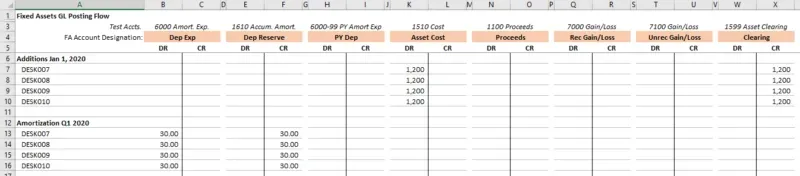
Here is the pre-retirement spreadsheet for the 2020 assets:
… and the 2019 asset:

Scenario #1 – Proceeds exceeding cost
In this example, I have 2 retirements, one with cash proceeds and one with non-cash proceeds. The assets had been amortized for 1 quarter, $30, and had an NBV of $1,170 before retirement. The retirement process, consistent with the previous examples in previous weeks, backs out the YTD amortization and the entire cost is the gain/loss (if there weren’t any proceeds).
In this case, DESK007 is sold for cash of $2,000.
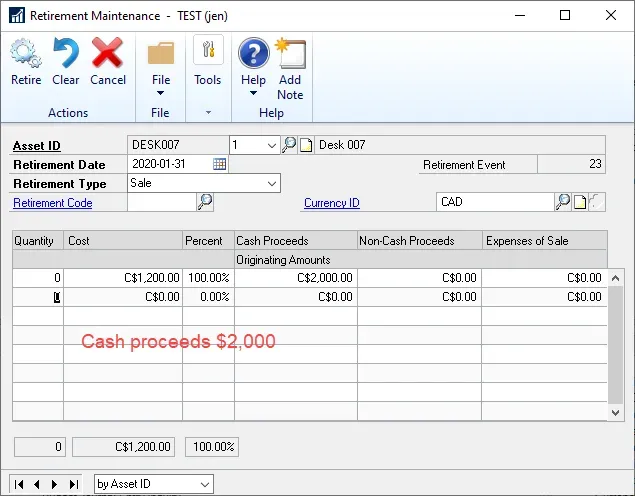
DESK009 is sold for some non-cash consideration, also valued at $2,000.

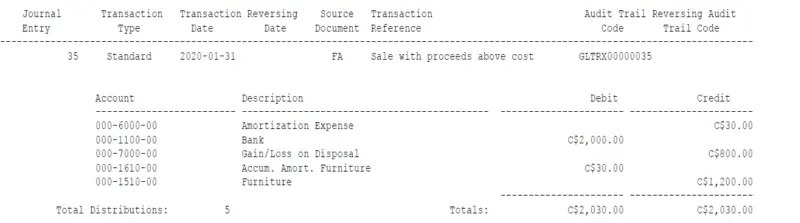
After backing out YTD amortization, the net result is a Gain on disposal of $800. In the screenshot below my default Proceeds account is my Bank GL, which is what is also used for the Non-Cash Proceeds journal entry.
Scenario #2 – Proceeds exceeding cost with sale expenses
In this example, I have another 2 retirements, one with cash proceeds and one with non-cash proceeds but both sales have had some costs associated with getting the asset ready for sale that I wanted to incorporate. What’s important to note here is there is no separate GL distribution for “sale expenses”, it is netted from Gain/Loss so any actual costs associated with selling or disposing of an asset may require a separate journal entry to offset against this gain/loss.
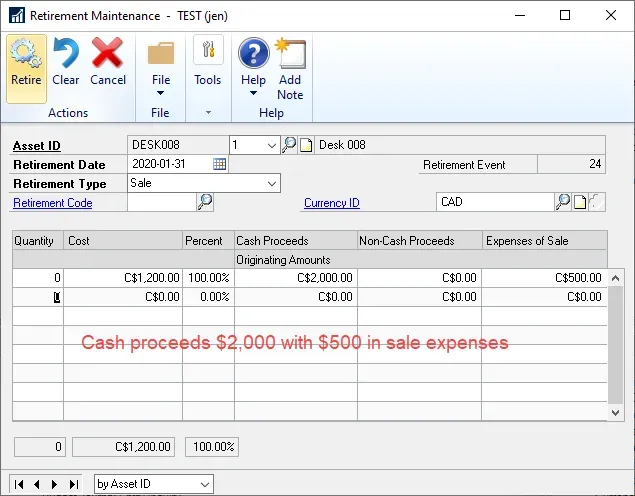
Here’s asset DESK008 with cash proceeds of $2,000 and sale expenses of $500.
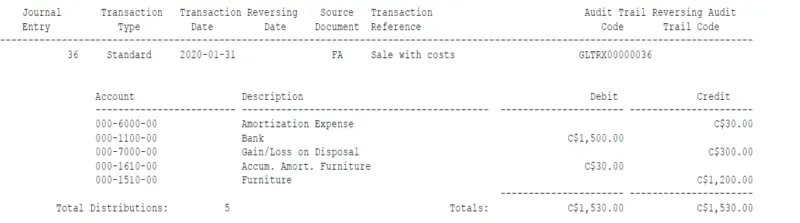
… and here is DESK010 with non-cash proceeds valued at $2,000 and also having $500 in sale expenses.
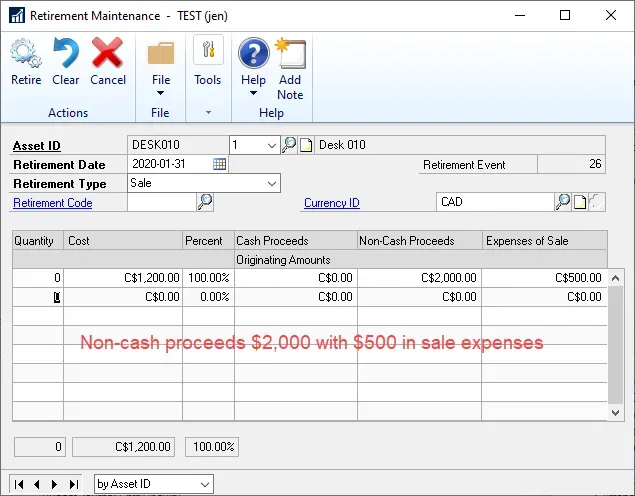
After backing out YTD amortization, the gain without factoring in the sale costs would be $800 again, like the previous examples, but once the sale expenses are factored in, the net gain is recorded at $300. It’s assumed the sale expenses were paid out of the proceeds so the Proceeds account is also reduced to $1,500.
Scenario #3 – Proceeds less than cost
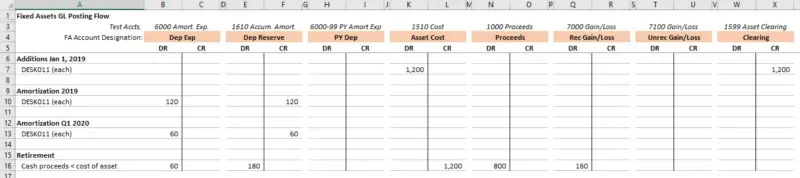
For this example, I did not complete multiple retirements as I think the trend of what’s occurring is clear from the previous examples. The asset I used in this example was the 2019 DESK011, one of the last ones not yet retired.
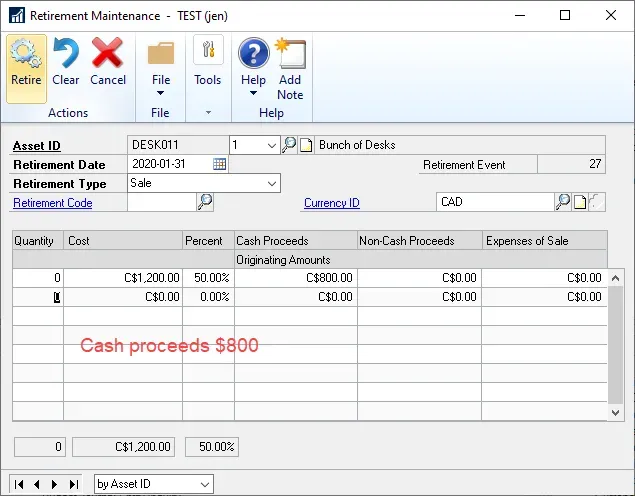
The retirement entry calculated an additional $60 Amortization Expense, consistent with the previous weeks’ examples. With proceeds of $800 and an NBV of $960 before retirement, the result is a Loss on disposal of $160.
The screenshot of the GL impact is showing some odd rounding which is due to my use of an asset that has been partially retired. Normally the numbers I’m using in this example would result in no rounding!

Summary
The net result of these examples is the following:
- Realized Gain/Loss = Proceeds (both kinds) – Sale Expenses – NBV of the asset.
- For Like-Kind Exchange, with proceeds, the Gain/Loss could be recognized as well as unrecognized depending on the amounts in question.
- If the Gain > Cash Proceeds, it’s Realized Gain/Loss
- If the Gain is positive but
- If there is a Loss, it will use Unrealized Gain/Loss.
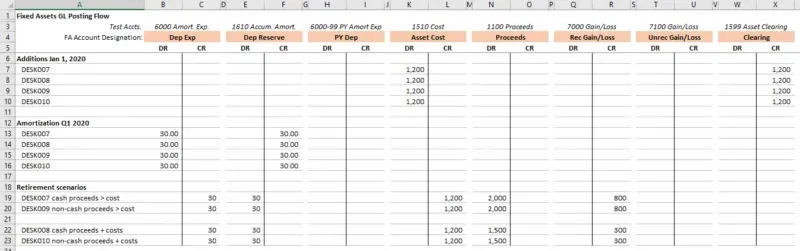
Here are the final spreadsheets for the 2020 and 2019 assets used, respectively:
That’s it for retirement entries. I could continue with other permutations and combinations but I think at this point, there’s not much new to be learned!